
Retail · For Retailers ·
Module 04 · Stock
Ecommerce stock control Know before anyone else which products are missing in your store and at competitors.
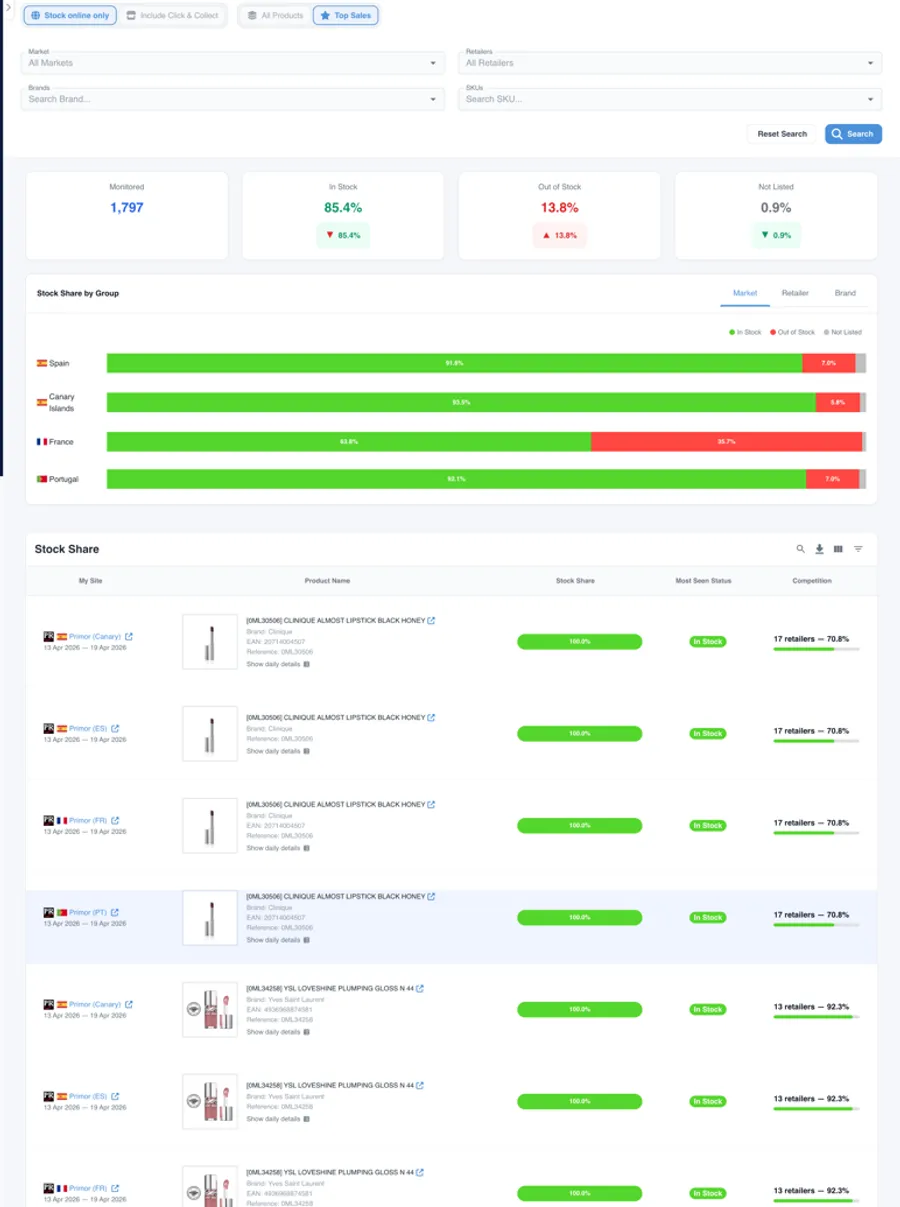
Stock Intelligence
A stockout does not only cost you one sale.
Monitor the availability of every brand in your catalogue in real time. Detect stock gaps by brand, category and market. Negotiate with your suppliers on data, not on intuition.
Market coverage
Daily availability of your whole catalogue and the competition's.
Stockouts detected
When they start, how long they last and in which channel or market.
Competitive opportunities
Benchmarking against other retailers and real-time alerts.
Qué incluye
Stock Intelligence, en detalle
-
Availability by SKU
In your store and across all your competitors.
-
Out of stock at competitors
An immediate window of opportunity.
-
Stockout alerts
When your catalogue fails unexpectedly.
-
Coverage rate
What % of references you have available.
-
Stockout history
When they happen, how long they last and how often.
-
Seasonality
Stock patterns by category and season.
Ecommerce inventory management: your catalogue and your competitors', in real time
A product out of stock in your store is a customer who goes to another retailer. And when that customer leaves, they rarely come back alone. Data Seekers gives you complete visibility of product availability on your platform, and on your competitors', so you can act before losing that sale.
Features
Four blocks to control stock
Stockouts in your catalogue, availability by brand, comparison against other retailers and alerts: what a buying team needs to act every day.
📉 Stock-Out Detection in Your Catalogue
Identify in real time which SKUs are out of stock on your platform, for how many days and what the estimated impact on conversion is. Prioritise replenishments that generate the most revenue.
📊 Stock Share by Brand and Category
Compare the availability rate of each brand within your catalogue. Detect which suppliers have recurring supply problems and negotiate replenishment agreements with concrete data.
| Brand | Listed assortment | In Stock | Status |
|---|---|---|---|
| Brand A | 5/16 (31%) | 3/5 (60%) | ⚠️ Partial |
| Brand B | 4/4 (100%) | 3/4 (75%) | ✔️ Good |
| Brand C | 18/26 (69%) | 16/18 (89%) | ✔️ Good |
| Brand D | 14/21 (67%) | 14/14 (100%) | ✔️ Strong |
| Brand E | 177/212 (83%) | 168/178 (94%) | 🏆 Leader |
⚠️ = Partial availability · ✔️ = Good availability · 🏆 = Best availability in the catalogue.
🔍 Benchmarking Against Other Retailers
What availability does your competition offer in the same categories? Identify where you are ahead and where you are losing traffic due to lack of stock in key products.
🔔 Configurable Alerts by Priority
Define alerts by brand, category, SKU or stock threshold. Your team receives automatic notifications to act without needing to review dashboards manually.
Ideal for retailers who…
Data Seekers is designed for buying and operations teams that:
- Manage multi-brand catalogues and need centralised visibility.
- Want to negotiate with suppliers using historical data.
- Need to compare availability against other retailers.
- Have lost traffic due to stock gaps.
Spot the availability that changes your position in the market.
Track the availability of your products and of competing references by SKU, retailer, marketplace and market. Identify stockouts, how long they last and incidents, so you can act with commercial context.
When a product goes unavailable it loses visibility and leaves room for the competition. Tracking the status and its duration lets you prioritise where to look first.

What it includes
Stock Intelligence for Retailers, in detail:
Market-wide availability, stockout history, alerts and the comparison by category, in one place.
How it is used
How retailers use stock control to negotiate better with suppliers
Data Seekers puts two types of information in your team's hands that change supplier conversations. When you arrive at a negotiation with historical stock data, days without inventory and a comparison against other retailers, the conversation changes. You stop asking and start demanding. These are the type of insights that Data Seekers puts in your team's hands every day.
From a stock incident to a commercial opportunity.
- 1 Detect the changeIdentify which products, channels or markets have changed availability status. Every morning, with the previous day's capture.
- 2 Measure duration and recurrenceAnalyse how long the stockout lasts and how often it repeats over time. One day without stock is an incident; five a month is a supplier problem.
- 3 Cross availability, price and assortmentCombine stock data with price and assortment to identify commercial opportunities: where to cover the demand the competition leaves open and where to look first.
Availability in market context.
An isolated stock figure says little. Compared against other retailers, other channels and other seasons, it tells you where the problem is and where the opportunity is.
- By SKUCompare the availability of the same SKU across different retailers, marketplaces and markets.
- By channelAnalyse how the availability of your products and of the competition varies between online and retail channels.
- By seasonCompare availability across seasons to identify patterns and anticipate opportunities.
A leading retailer in its category had been out of stock on a key SKU for 15 days. Its direct competitor remained available. With that information, the buying team pressured the supplier and secured priority replenishment within 48 hours.
A Digital Director detected that three top brands in their catalogue had availability rates below 70%. With that data on the table, they renegotiated supply agreements in the following quarter.
Lo que este módulo cambia en tu día a día
You know what is missing and since when
Which SKUs are out of stock in your store, for how many days and with what estimated impact on conversion, so you prioritise the replenishments that generate most revenue.
You negotiate with suppliers using data
Availability rate by brand, days without inventory and comparison against other retailers. You stop asking and start demanding.
You win when the competition fails
When a competitor runs out of stock on a key product, you know the same day and you can cover that demand.
FAQs
Frequently asked questions about ecommerce stock control for retailers
What stock information can a retailer monitor with Data Seekers?
Data Seekers tracks the availability of every SKU in your catalogue in real time: stock status, days without inventory, last available date and estimated sales impact. It also allows you to compare the availability of your brands against other retailers in the same market.
How does stock analysis help in negotiating with suppliers?
With historical availability data by brand and SKU, the buying team can identify which suppliers have recurring supply problems, how many days of potential sales have been lost and how that brand compares to others in the same catalogue. It is the strongest argument in a replenishment agreement negotiation.
Can I compare my stock availability against other retailers?
Yes. Data Seekers includes multi-retailer benchmarking: you can see how your availability rate in a category compares to other retailers in the same market, identify which products are losing you traffic and detect opportunities where competitors have stock gaps you can fill.
How often is stock information updated?
Data is updated daily for all monitored retailers and categories. For periods of high demand or critical categories, the frequency can be adjusted according to the client's needs.
Does the system generate automatic alerts for the buying team?
Yes. Alerts are fully configurable by brand, category, SKU or availability threshold. The team receives real-time notifications without needing to monitor dashboards manually, enabling them to react in hours rather than days.
How does stock analysis integrate with other Data Seekers modules?
The Stock Intelligence module natively complements Pricing Intelligence, Digital Shelf and Catalogue Analysis. For example: if a brand has low availability and its prices are above market, you can see both signals on the same dashboard and act in a coordinated way in the negotiation.
What type of retailers is this module designed for?
Data Seekers works with retailers and pure players in sectors such as beauty, health, pharma and FMCG. The module adapts to the size of the catalogue, the markets in which the retailer operates and the competitors it wants to monitor.
How many days has your catalogue had stock gaps you're not seeing?
Request a demo and in less than 30 minutes we'll show you the availability status of your catalogue versus your competitors', in the categories that matter most to you.